
I’ve built or rebuilt more than 1,000 websites, and the work I’ve led has driven more than $6 billion in client revenue. Most of those sites ran WordPress, and almost all of them ran either Yoast SEO or Rank Math at some point. I’ve installed both, migrated between them in both directions, and cleaned up after both. This comparison is based on that hands-on experience, and I checked every fact against the vendors’ own pages and Google’s documentation.
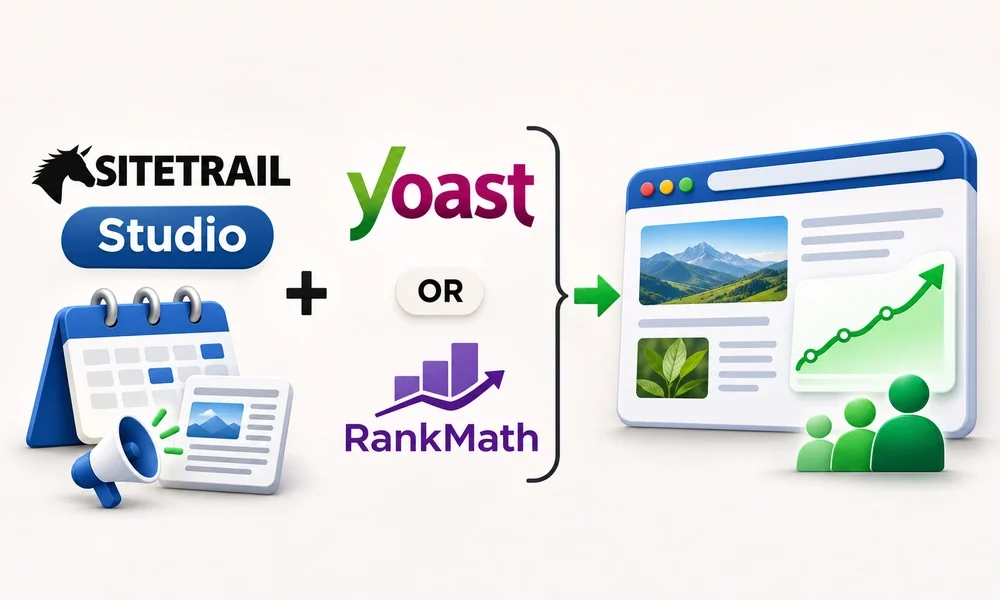
The short answer: Yoast SEO and Rank Math are both capable on-site SEO plugins. Run one of them, never both. Rank Math gives you more for free and costs less across many sites. Yoast is more conservative and has the cleaner recent security record, so it’s my default for sites where reliability matters most. Neither plugin does off-site SEO. That means earned coverage on real publications, which both Google and AI assistants draw on, and it’s why I pair either plugin with Sitetrail Studio.
Quick verdict
- Best for safety and stability: Yoast SEO, by a small margin.
- Best free feature set: Rank Math. Redirects, a 404 monitor and multiple focus keywords are free.
- Best value across many sites: Rank Math PRO and Business.
- Best “all-in-one” paid plan for one site: Yoast SEO Premium, which now bundles Local, Video and News SEO.
- Never: run Yoast and Rank Math together.
- Always: pair your one on-site plugin with an off-site tool such as Sitetrail Studio.
The most important point: pick one on-site plugin, then add off-site
Most comparisons skip this, so I’ll start with it.
Yoast SEO and Rank Math do the same job and must never run together. Both write your title tags and meta descriptions, output a schema graph, generate XML sitemaps, set canonicals and robots directives, and (in Rank Math free or Yoast Premium) manage redirects. If you run both, you get two sources of truth for every one of those. That means competing meta tags, duplicated or conflicting structured data, two sitemap generators and redirect rules fighting each other. I’ve been called in to fix sites where an owner “tried Rank Math” without deactivating Yoast, and the mess was always the same. Choose one.
Both of them work fine alongside Sitetrail Studio, and you should run one of them with it. The reason is simple. Yoast and Rank Math only handle on-site SEO, meaning what’s on your own pages. Studio handles off-site work. It’s a free WordPress PR and SEO plugin built to strengthen media presence, search visibility and discoverability in AI answers through relevant news sites and niche blogs. None of its listed features touches your titles, meta, sitemaps or schema, so there’s nothing to conflict with.
Here’s what Studio does:
- Connects to the NewsPass network of 100+ news sites and niche blogs. You can preview a sample without signing in.
- Off-site content calendar (month, week and list views) plus an Evidence Library for figures, quotes and source links.
- Ten off-site formats with complete examples, including press releases, data-led stories, how-tos, expert Q&As and opinion pieces.
- Submit from WordPress. You can import a Google Doc or paste an article, and you see the outlet’s requirements first. Editorial review applies to every submission.
- One free media submission for eligible accounts. A verified, free Sitetrail account can send one English-language article or press release for editorial review at the participating outlet. Verified accounts also get up to 25 AI article ideas for life.
- Tracks coverage. “Coverage by page” groups articles by the pages they link to, and an “As featured in” shortcode shows up to 12 live articles on your About or press page. It works in Gutenberg and Elementor.
- Built for agencies that run client campaigns, and the free local tools can go on multiple sites.
Why off-site matters. Google’s own guide to optimizing for generative AI search says its AI features “can show what’s being said about products and services across the web.” It also warns that “seeking inauthentic ‘mentions’… isn’t as helpful as it might seem.” I read that as a clear instruction: real coverage counts and manufactured mentions don’t. The goal is genuine stories that pass an editor, with claims a reader can check. Your on-site plugin makes your pages easy for machines to read. Off-site coverage gives people and AI systems a reason to trust and cite you. You need both.
Yoast SEO vs Rank Math at a glance
Current figures come from the official listings: Yoast SEO on WordPress.org and Rank Math SEO on WordPress.org.
| Feature | Yoast SEO | Rank Math SEO |
|---|---|---|
| First published on WordPress.org | Oct 2010 | Nov 2018 |
| Current version | 28.9 | 1.0.282 |
| Active installs | 10+ million | 4+ million |
| WordPress.org rating | 4.8★ (~27,800 reviews) | 4.8★ (~7,500 reviews) |
| Minimum WordPress / PHP | WP 7.0 / PHP 7.4 | WP 6.7 / PHP 7.4 |
| Support threads resolved (last 2 months) | 40 of 47 | 33 of 39 |
| Release cadence | Stated 2-week cycle | Frequent, often weekly |
| Paid entry price | Premium: $118.80/yr per site (ex VAT) | PRO: $107.88/yr after first year, unlimited personal sites |
| Multi-site paid plans | Per-site subscriptions, bulk discounts, custom agency pricing for 100+ sites | Business $335.88/yr, Agency $779.88/yr renewal (client-site limits apply) |
| Redirect manager | Premium only | Free |
| 404 monitor | No | Free |
| Focus keyphrases | 1 free, up to 5 in Premium | 5 by default in free (more with a filter) |
| Schema approach | Single connected graph. Premium adds more types and schema aggregation for NLWeb | Module-based, 20+ predefined types, custom Schema Builder and templates in PRO |
| Local SEO | Yoast Local SEO now included with Premium | Basic in free, multi-location in PRO |
| WooCommerce | Separate paid Yoast WooCommerce SEO extension | Automatic product schema in free, advanced (GTIN/MPN etc.) in PRO |
| AI features | Included in Premium, no credits | Free tier (1–5 uses per feature). Paid Rank Math AI plans with monthly limits |
| llms.txt | Yes, free | Yes, free (LLMS Txt module) |
| Imports from the other plugin | Rank Math titles, descriptions, keyphrases only | Yoast settings, post/term/user meta, redirects, blocks |
Rank Math is running a Black Friday sale as I write this, so first-year prices on its site are temporarily lower. The renewal figures above are the ones that matter.
Where Rank Math is genuinely better
I’ll be straight about this: on paper, Rank Math wins more categories.
A far more generous free version
Rank Math free includes a redirect manager, a 404 monitor, up to five focus keywords, basic local SEO and automatic WooCommerce product schema. With Yoast, redirects need Premium. For a small business that can’t justify a subscription, Rank Math free does more out of the box.
Price across many sites
Rank Math PRO covers unlimited personal sites (ones you own outright) for $107.88 a year at renewal. Yoast Premium is $118.80 a year per site. If you run a portfolio of your own sites, Rank Math is much cheaper. For client work, you need Rank Math Business or Agency, which is still usually cheaper per site than buying Yoast Premium site by site.
Schema flexibility
Rank Math PRO’s Schema Builder lets you build custom types, use templates and conditional rules, and even import schema from other pages. If you need non-standard markup for a specific rich result you’re eligible for, Rank Math gets you there faster.
Built-in analytics and rank tracking
Rank Math connects to Search Console and Analytics inside WordPress, and PRO adds keyword rank tracking. Yoast relies on integrations like Wincher and Semrush for that.
The importer
Rank Math’s Yoast importer brings over settings, post, term and user meta, Yoast Premium redirects and Yoast blocks. Yoast’s Rank Math importer brings over titles, descriptions and focus keyphrases, and nothing else. That gap matters a lot, and I’ll come back to it in the lock-in section.
Where Yoast is genuinely better
Track record and conservative releases
Yoast has been on WordPress.org since 2010 and runs on 10+ million sites. Its releases follow a published two-week cycle and they’re rarely dramatic. Across a large portfolio, “boring” is a feature, because I don’t want an SEO plugin surprising me.
Security record
The disclosures below show where the gap became measurable:
- Rank Math free: Search Engine Journal reported 16 disclosed vulnerabilities, more than any other SEO plugin. Two were 8.8-rated remote code execution flaws that needed only Contributor or Author access (CVE-2026-1928 and CVE-2026-81757). Several could be exploited without logging in, and seven involved missing authorization checks. All were patched.
- Rank Math PRO: In October, some Rank Math PRO 3.0.123 downloads made on October 15–16 contained malware from a supply-chain compromise. It was rated CVSS 9.8, CVE-2026-111862. Rank Math’s own incident page tells affected users to treat their site as compromised. The clean version is 3.0.124, and the free version from WordPress.org was not affected.
- Yoast: SEJ counted four vulnerabilities in Yoast free and two in Premium in the same reporting period. One Premium issue was serious. CVE-2026-10821 let an Author-level user inject
.htaccessdirectives when file-based redirects were enabled, which could lead to remote code execution. It was patched in 27.6.1.
Neither plugin is “safe” in some absolute sense. Every popular plugin gets CVEs, and both vendors patched quickly. But fewer disclosures, fewer modules and no supply-chain incident is what I mean when I say Yoast is the lower-risk choice right now.
One paid plan that covers more
Yoast SEO Premium now includes the Local SEO, Video SEO and News SEO plugins at no extra cost, plus 24/7 support and a Google Docs add-on seat. Many comparisons still say Yoast Local is a separate purchase. That’s out of date.
AI without metering
Yoast’s AI tools (Generate, Optimize, Summarize, Content Planner and bulk AI metadata drafts) come with Premium, with no separate AI subscription and no credit top-ups. Rank Math’s AI is a separate subscription (more below).
Developer surface
Yoast’s indexables system, REST API, Surfaces API and Schema API are well documented, and its single schema graph is easy to extend cleanly. On custom builds and headless setups, I’ve found Yoast’s output more predictable.
AI features compared
Yoast: AI Generate writes five title and meta description options. AI Optimize suggests keyphrase placement edits. AI Summarize creates a post summary, and the AI Content Planner proposes ideas based on your site. Bulk AI metadata drafting is also in Premium. Premium adds a bot blocker for AI crawlers (GPTBot, CCBot, Google-Extended) and schema aggregation for NLWeb. There’s also an Abilities API so AI tools can read your Yoast data.
Rank Math: Content AI has been rebranded Rank Math AI, and it no longer uses credits. Since Rank Math SEO v1.0.269, it uses monthly per-feature usage limits. Free users get one to five uses per feature. The paid plans are Starter, Creator and Expert, billed annually and renewing at $83.88, $143.88 and $227.88 a year. Recent additions include AI Link Genius for internal links, AI Visibility for tracking brand mentions in ChatGPT and Gemini, a Rank Math MCP connector for AI assistants, and an in-plugin support assistant. Any comparison that still describes Rank Math’s AI as “credit-based” is out of date.
llms.txt: Both plugins generate one for free. But be clear about what it does. Google’s AI optimization guide says Google Search doesn’t use llms.txt, and that it “will neither harm nor help your site’s visibility or rankings in Google Search.” It may help other AI systems. It isn’t a reason to pick either plugin.
My strong opinion: Rank Math treats Google as if it’s stupid (and Yoast does it too, a little)
This is my professional opinion. It’s about design philosophy, not about the people at either company.
Rank Math’s content analysis is built around a score out of 100. Its own guide is titled “Score 100/100 With Rank Math Post Tests”. To get there, it rewards:
- Content over 2,500 words for a full score on content length, and 0% under 600 words.
- Keyword density of 1–1.5%.
- Your focus keyword in the SEO title, meta description, URL, the start of the content and subheadings.
- A “power word”, a number and a positive or negative sentiment in the title.
Now compare that with what Google actually says in its SEO Starter Guide:
- “The length of the content alone doesn’t matter for ranking purposes (there’s no magical word count target, minimum or maximum…).”
- “Keyword stuffing is against Google’s spam policies.”
- Keywords in the domain or URL path “have hardly any effect beyond appearing in breadcrumbs.”
- “Google Search doesn’t use the keywords meta tag.”
And in its AI optimization guide: “AI systems can understand synonyms and general meanings… you don’t have to worry that you don’t have enough ‘long-tail’ keywords.” Juggling multiple focus keywords so every variation shows up is exactly the kind of work Google says it does for you.
Google also writes your snippets and titles itself. Its snippet documentation says snippets are “primarily created from the page content itself.” Its title link documentation says Google “uses a number of different sources to automatically determine the title link.” Google also picks canonicals itself, treating your tag as one signal among several (canonicalization docs). Your meta fields are hints, not commands.
Schema is the clearest example. Google says structured data makes pages eligible for certain rich results. Its AI guide calls “overfocusing on structured data” a myth: “there’s no special schema.org markup you need to add.” The list of rich results keeps shrinking, too. Google stopped showing How-to rich results in 2023, and the FAQ rich result stopped appearing in Google Search on May 7. Google has since removed its FAQ documentation. Both plugins still offer FAQ schema blocks. That’s harmless, but it no longer earns you anything visible in Google. Rank Math’s pitch of “20+ schema types” and importing schema from other websites encourages people to pile up markup that Google won’t reward unless the page qualifies for a supported rich result.
Yoast isn’t innocent. Its signature traffic lights include keyphrase density and distribution checks. Its AI Optimize tool suggests edits to keyphrase placement, distribution and density, and Premium lets you optimize for up to five keyphrases. Readability scores can help people write clearly, which is useful. But Google has never documented a Flesch score or passive-voice percentage as a ranking input. The difference is degree. Yoast’s lights work as a writing aid, while Rank Math’s 100-point score becomes a target people chase.
What I tell my teams: use either plugin’s analysis as a checklist for humans, then ignore it. I’ve watched writers make good articles worse by forcing a keyphrase into a subheading so it turns green, or padding past 2,500 words to get a score up. Google is good at working out what a page is about. Write for the reader, get the technical basics right, and spend the time you save earning real coverage elsewhere.
Lock-in: what happens when you leave (especially Rank Math)
This is the section most reviews skip, and in my experience it’s where the real cost of choosing a plugin shows up.
Where each plugin stores your data
- Yoast stores per-post SEO data in post meta with keys prefixed
_yoast_wpseo_(titles, descriptions, keyphrases and so on), settings inwpseo*options, and its indexables in custom tables:wp_yoast_indexable,wp_yoast_indexable_hierarchy,wp_yoast_migrations,wp_yoast_primary_term,wp_yoast_seo_links, andwp_yoast_prominent_wordsin Premium (Yoast’s uninstall guide). Premium redirects are stored in the options table, and in server mode they can also be written to.htaccessor an include file. - Rank Math stores per-post data in
rank_math_*post meta, schema asrank_math_schema_*post meta, and redirects, 404 logs, internal-link data and analytics in its own*_rank_math_*tables. Its uninstall guide confirms that deleting the plugin leaves all of this in the database unless you add a filter to wipe it.
Both plugins keep your data when you deactivate them, which is good. But neither format means anything to the other plugin without an importer.
Why I say “especially Rank Math”
- The importers aren’t equal. Going Yoast → Rank Math brings over most things: settings, meta, Premium redirects and Yoast blocks. Going Rank Math → Yoast, Yoast’s importer brings over titles, descriptions and keyphrases only. Rank Math’s own migration page confirms that your settings, per-post schema and redirects don’t transfer. So the more you build in Rank Math, the more you’ll rebuild by hand if you leave.
- Module dependence. Rank Math’s redirects, 404 monitor, schema templates, analytics, local SEO and llms.txt are all modules inside one plugin. Deactivate Rank Math and every redirect stored in its table stops working at once, unless you’ve exported them to another tool first.
- Account dependence. Rank Math’s PRO license is activated by connecting your site to RankMath.com rather than with a license key. The API-driven features (analytics, AI, AI Visibility) need a Rank Math account. Downgrading keeps your data in WordPress but disables paid features until you renew.
Yoast has lock-in too, mostly around redirects. If Premium lapses and you remove it, the redirect manager’s PHP redirects stop being served. Export the CSV first (Tools → Import and Export). If you used server-mode redirects, clean up the rules Yoast wrote to .htaccess.
My rule on every build: keep redirects in a form you can export, and keep custom schema to what you actually need. Then your SEO plugin is replaceable. That’s the right relationship to have with any plugin.
Choose Yoast SEO if…
- You want the lowest-risk, most conservative option for a business-critical site.
- You publish editorial content and want guided, readable writing feedback for a team of non-SEOs.
- You’ll pay for one site and want Local, Video and News SEO included in one plan.
- You build custom or headless sites and value Yoast’s documented APIs and schema graph.
- You want AI help without metered limits or a second subscription.
Choose Rank Math if…
- You need redirects and a 404 monitor for free, and Premium isn’t in the budget.
- You run many sites you own and want one low-cost PRO license.
- You need custom schema for rich results you’re actually eligible for.
- You want rank tracking and Search Console data inside WordPress.
- You’ll keep it updated without fail. I wouldn’t run Rank Math anywhere that plugins aren’t patched quickly.
Either way: one of them, plus Sitetrail Studio for off-site.
How to switch safely (either direction)
- Take a full backup of files and database. Make sure you can restore it.
- Crawl the live site with any SEO crawler and save titles, meta descriptions, canonicals, robots directives and status codes. This is your baseline.
- Export redirects separately: CSV from Yoast Premium, or the export from Rank Math’s Redirections module.
- Note your schema. List any custom or per-post schema, especially from Rank Math, because it won’t move to Yoast.
- Deactivate the old plugin. Don’t delete it yet. Its data stays in the database for the importer.
- Install the new plugin and run its importer. For Rank Math → Yoast, use Yoast SEO → Tools → Import and Export → Import from other SEO plugins. For Yoast → Rank Math, use the setup wizard’s import step, then convert Yoast blocks with Rank Math’s Database Tools.
- Rebuild what didn’t transfer: settings, redirects (in the new plugin or a standalone redirect tool) and essential schema.
- Re-crawl and compare against your baseline. Fix any page where the title, canonical or robots value changed.
- Resubmit your sitemap in Search Console and watch the Pages and Performance reports for a few weeks.
- Delete the old plugin last. Only remove its leftover data once you’re sure you won’t roll back. If you used Yoast’s server-mode redirects, check
.htaccessfor leftover rules.
Never run both plugins “just for the migration window.” That window is exactly when the conflicts do damage.
Final verdict
If you made me choose one for a site I’m responsible for, I’d choose Yoast SEO, by a slim margin. That’s based on its 16-year track record, a measurably quieter security year, conservative releases and less module sprawl. Rank Math is the better choice if you need a generous free tier, many-site pricing or custom schema, and if you keep it patched.
But the bigger mistake I see isn’t picking the “wrong” one of the two. It’s running both, or assuming either one covers all of your SEO. They cover on-site work. The trust signals that Google’s systems and AI assistants rely on come mostly from what’s published about you elsewhere. Pick one on-site plugin, never both, and add Sitetrail Studio for off-site. It’s free to install, and eligible accounts get one free article submission to a real publication.
FAQ
Can I run Yoast SEO and Rank Math at the same time?
No. Both output meta tags, schema, sitemaps, canonicals and (in Rank Math free or Yoast Premium) redirects, so running both creates duplicate and conflicting output. Choose one and deactivate the other.
Can I use Yoast or Rank Math with Sitetrail Studio?
Yes, and you should. Yoast and Rank Math handle on-site SEO, while Studio handles off-site work: planning stories, submitting them to publications in the NewsPass network and tracking coverage. Studio doesn’t touch your meta, sitemaps or schema.
Is Rank Math free better than Yoast free?
On features, yes. Rank Math free includes redirects, a 404 monitor and up to five focus keywords, which Yoast reserves for Premium or doesn’t offer. On recent security record and release stability, Yoast is ahead.
How much do Yoast Premium and Rank Math PRO cost?
Yoast SEO Premium is $118.80 a year per site (ex VAT) and includes Local, Video and News SEO. Rank Math PRO renews at $107.88 a year for unlimited personal sites, with Business at $335.88 and Agency at $779.88 a year. Rank Math AI is a separate subscription.
Has Rank Math had a security incident?
Rank Math PRO had a supply-chain incident. Some 3.0.123 downloads on October 15–16 contained malware (CVE-2026-111862), and version 3.0.124 is the clean replacement. The free WordPress.org version wasn’t affected, according to Rank Math.
Does llms.txt from Yoast or Rank Math help my Google rankings?
No. Google says Search ignores llms.txt and that it won’t help or harm your visibility (source). It may help other AI services, and both plugins generate it for free.
Do I need a 100/100 Rank Math score or all green Yoast lights to rank?
No. Google says there’s no ideal word count, that keyword stuffing breaks its spam policies, and that its systems understand synonyms (SEO Starter Guide). Treat the scores as writing aids, not ranking targets.
Will I lose data switching from Rank Math to Yoast?
Partly. Yoast imports your titles, meta descriptions and focus keyphrases, but not Rank Math’s settings, per-post schema or redirects. Export redirects first and rebuild the essential schema by hand.