WordPress Performance Suite + Cache Plugin for Elementor, WooCommerce and Cloudflare
Sitetrail Turbo is an all-in-one WordPress performance suite built for businesses that need more than a basic caching plugin.
It combines full-page caching, CSS and JavaScript optimization, local image compression, WebP and AVIF conversion, Cloudflare control, WooCommerce safeguards, real-user Core Web Vitals tracking, restore points, agency reports and optional AI-assisted diagnostics in one streamlined plugin.
Everything important happens locally on your own server.
There is no hosted image-processing dependency. No mandatory external speed scanner. No analytics data uploaded to Sitetrail. No SaaS platform sitting between you and your website. No requirement to create a Google Cloud account or configure PageSpeed Insights API keys before you can obtain useful performance insights.
Whether you manage one Elementor website, a growing WooCommerce store, a portfolio of client sites or an entire WordPress hosting environment, Sitetrail Turbo gives you a practical performance control center.
All the Tools You Need in One Free Plugin
WooToolbox includes seven key features designed for real-world store management:
Most WordPress performance problems are not caused by one single issue.
A slow website is usually the result of several small problems stacking up:
Sitetrail Turbo brings these moving parts together inside one system.
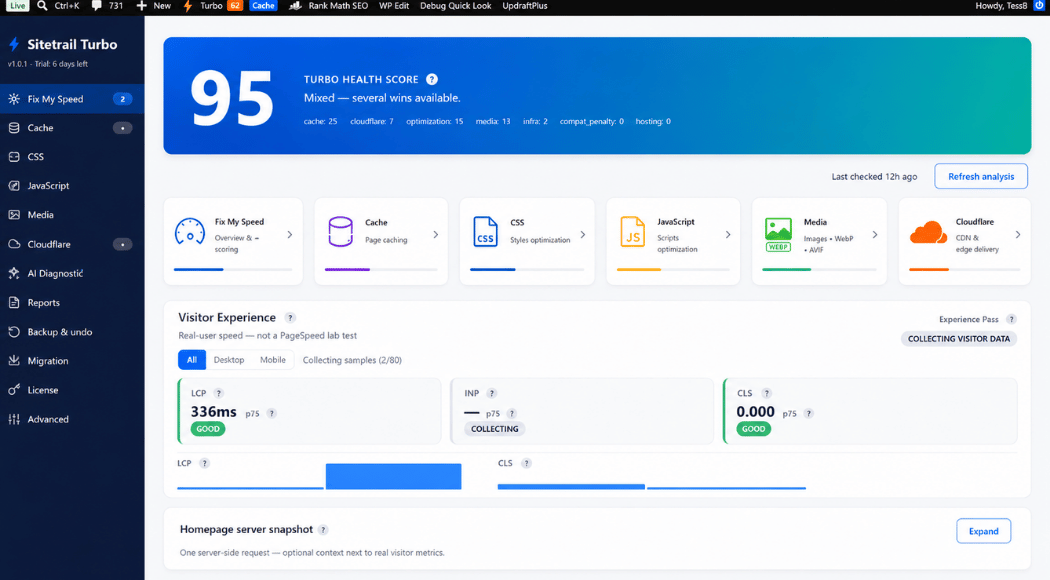
Instead of asking you to navigate a maze of disconnected settings, the plugin gives you a prioritized performance dashboard called Fix My Speed™.
The dashboard analyzes your local WordPress configuration and shows you what is already working, what needs attention and which fixes are most likely to make a meaningful difference.
The first thing you see is your Turbo Health Score™: a practical 0–100 overview of your current performance setup.
It is not a vague vanity score. It is not a simulated Google PageSpeed number. It is a local configuration assessment based on factors such as:
You can then apply the most relevant improvements using clearly explained Safe, Balanced or Maximum optimization presets. Presets are especially useful for entry-level users. You may also request instant AI assistance for a more guided experience.
Advanced users remain in control. Every major optimization can be adjusted individually.
A one-off laboratory test can be useful, but it does not always reflect the experience of your actual audience.
Sitetrail Turbo includes Visitor Experience™, a lightweight real-user monitoring system that measures how your WordPress site performs for real visitors over time.
The dashboard tracks important Core Web Vitals metrics, including:
Results are shown at the 75th percentile using familiar “good”, “needs improvement” and “poor” threshold bands, with separate desktop and mobile visibility.
Your analytics remain local. Aggregated performance data is stored in your own WordPress database. There is no visitor table, no session table and no analytics feed sent back to Sitetrail.
The beacon system is sampled and lightweight, with safeguards designed to prevent analytics from becoming a performance problem of its own.
Sitetrail Turbo includes a filesystem-based HTML page cache designed to reduce server load and deliver pages more quickly.
Features include:
The plugin also recognizes an important reality: some servers already provide excellent full-page caching.
When Sitetrail Turbo detects LiteSpeed Server Cache, FastCGI Cache, Varnish or supported managed-host caching, it can enter Purge Mode.
In Purge Mode, Turbo avoids duplicating the host’s page cache. It continues to deliver analytics, diagnostics, asset optimization, image tools, Cloudflare controls and coordinated cache purging without creating unnecessary overlap.
Performance optimization becomes more complicated when a website has dynamic pages.
A basic configuration that works well for a brochure site can easily cause problems on an online store, membership platform or form-heavy website.
Sitetrail Turbo includes protections for:
admin-ajax.php requestsIt also includes compatibility rules for popular WordPress tools and environments, including Elementor, Divi, Gutenberg, JetEngine, JetFormBuilder, Gravity Forms, Contact Form 7, WPForms, LearnDash, LifterLMS, WPML, Polylang and common membership plugins.
Optimization should make a website faster, not more fragile.
Sitetrail Turbo includes deep asset optimization without sending your site files to a hosted processing service.
You retain granular control without being forced to become a performance engineer.
Convert and optimize images without surrendering your media library. Heavy images are one of the most common causes of slow WordPress pages.
Sitetrail Turbo optimizes images locally using your own server resources.
Features include:
Your original images are preserved.
The priority order is simple:
AVIF → WebP → original image
Visitors receive a modern format when their browser and server environment support it, with graceful fallback when they do not.
Sitetrail Turbo includes Turbo Cloudflare Manager, giving you a more practical WordPress-aware Cloudflare workflow.
Cloudflare changes are previewed before they are applied and labeled clearly so they can be removed cleanly later.
When enabled, you enter your own OpenAI API key. The key is encrypted locally. Sitetrail does not proxy the request and does not add an artificial markup to your AI usage.

Fully Self-Hosted
Sitetrail Turbo is deliberately self-contained.
Your cache files stay on your server. Your image conversions happen on your server. Your reports are generated locally. Your Core Web Vitals aggregates remain in your database.
Routine external communication is limited to:
Sitetrail does not receive your visitor analytics.
Sitetrail does not receive your content.
Sitetrail does not quietly collect anonymous performance telemetry.
This makes Sitetrail Turbo particularly attractive to privacy-conscious businesses, professional developers, agencies and hosting providers that need predictable infrastructure behavior.
Built for….
Sitetrail Turbo is suitable for website owners who want to simplify their WordPress stack without relying on multiple disconnected optimization tools. It is equally useful for WooCommerce businesses that need faster page delivery without putting dynamic pages, cookies or checkout flows at risk.
For WordPress agencies, the plugin provides a more systematic way to improve client websites. Agencies can generate local HTML and PDF reports, schedule reports by email, use restore points and review change logs. Developers gain granular control over caching, CSS, JavaScript, modern image formats, server signals, exclusions, diagnostics and rollback options.
Sitetrail Turbo also openly welcomes hosting companies, managed WordPress providers and infrastructure partners. While some premium optimization plugins impose restrictions or additional barriers around host-led deployment, Sitetrail Turbo takes a more flexible approach.
The plugin is designed to coexist intelligently with hosting environments rather than override them. It detects managed-host and server-level caching conditions, including LiteSpeed, FastCGI and Varnish. When appropriate, Purge Mode disables duplicate page caching while preserving Cloudflare integration, image optimization, diagnostics, reports, Core Web Vitals and asset controls.
Hosting companies are not an afterthought. They are a natural fit for the product.
Sitetrail Turbo brings the most important WordPress performance tools into one plugin. It includes full-page caching, cache preloading, CSS and JavaScript optimization, WebP and AVIF image conversion, lazy loading, Cloudflare controls, real-user Core Web Vitals, WooCommerce-safe exclusions, restore points and migration tools. The result is a faster website, fewer overlapping plugins, clearer performance insights and more control over how optimizations are applied.
Yes. Sitetrail Turbo is designed as a serious alternative to WP Rocket for users who want more than page caching and basic front-end optimization. It will save you a fortune on “Imagify” image processing.
WP Rocket is a well-known caching plugin and remains a familiar choice for many WordPress users. However, Sitetrail Turbo is built for a broader use case.
It combines page caching with local image optimization, WebP and AVIF support, Cloudflare-first controls, real-user Core Web Vitals, WooCommerce safeguards, managed-host detection, Purge Mode, reports, multisite support, restore points and optional bring-your-own-key AI diagnostics.
For users who would otherwise install a caching plugin, an image-optimization plugin, a Cloudflare plugin and a separate performance-monitoring tool, Sitetrail Turbo can significantly simplify the stack.
Sitetrail Turbo is a strong alternative to WP Rocket when you want a more complete, self-contained WordPress performance suite. It goes beyond full-page caching and cache preloading by bringing CSS and JavaScript optimization, local Remove Unused CSS, local critical CSS, lazy loading, WebP and AVIF conversion, Cloudflare management, WooCommerce-safe exclusions, managed-host detection, Purge Mode, real-user Core Web Vitals, local reports, restore points, migration tools and optional AI diagnostics into one plugin. This makes it especially useful for businesses, agencies and developers that want to reduce plugin sprawl.
For many websites, Sitetrail Turbo can also replace the need for a separate image-optimization workflow such as Imagify. It includes local image compression, WebP conversion and AVIF conversion alongside its caching features. Original images are preserved, and the processing happens on your own server.
A normal YouTube iframe loads a heavy player, extra JavaScript, and third-party connections to Google’s servers as soon as the page loads — even if the visitor never watches the video. That can hurt PageSpeed, LCP, and Total Blocking Time.
WP Rocket can replace the iframe with a facade: a clickable thumbnail that only loads the real player after someone clicks. That helps a lot, but the thumbnail still usually comes from YouTube’s image servers, such as i.ytimg.com.
So you may still get a third-party DNS lookup, a third-party image request, and usually a JPEG thumbnail rather than an image optimized and served from your own site.
Sitetrail Turbo also uses a click-to-play facade, but it goes further:
Self-hosted thumbnails: The plugin downloads each video’s thumbnail once, stores it on your server, and serves it from your own domain, often as WebP. No request is made to YouTube’s image servers until the visitor actually clicks play.
Faster first paint: The preview image loads like any other local asset: same server, same connection, and a smaller modern format when WebP is available.
Warmer click-to-play: On hover or touch, the plugin preconnects to YouTube so the iframe starts loading faster when the visitor clicks.
Better for SEO and AI crawlers: The facade can include the real video title, alt text, a noscript iframe fallback, and VideoObject structured data when the title is known.
Smarter embed handling: Sitetrail Turbo preserves start time, playlist, and youtube-nocookie settings instead of stripping them.
Accessibility: The play control is keyboard-friendly, with proper role, tabindex, and aria-label attributes.
No. When YouTube facade mode is enabled, the plugin:
Finds YouTube embeds while building the page cache.
Shows a thumbnail immediately, using a remote fallback at first if needed.
Downloads and converts the thumbnail in the background.
Re-caches the page with the local thumbnail on the next pass.
There are no API keys, no extra plugins, and no per-video setup required.
Often, yes. With self-hosted thumbnails, no request goes to YouTube until the visitor clicks play. That is similar to the privacy pitch behind plugins like WP YouTube Lyte, but built into a broader performance suite and served as static files rather than through a PHP script on every thumbnail request.
Sitetrail Turbo is designed to replace WP Rocket’s caching and optimization stack, not to run alongside it.
If you are comparing the two, the YouTube embed story is simple: both use the facade idea, but Sitetrail Turbo adds local thumbnails, WebP, preconnect warmup, and crawler-visible metadata — features WP Rocket does not currently provide for YouTube facades in the same way.
The first pageview may still use YouTube’s hqdefault.jpg as a fallback. Once the background job finishes, that page is purged and re-cached with your self-hosted WebP thumbnail. Visitors after that get the faster local version automatically.
| Feature | WP Rocket | Sitetrail Turbo |
|---|---|---|
| Click-to-play facade | Yes | Yes |
| Thumbnail source | YouTube i.ytimg.com | Your server, with WebP when available |
| Third-party requests before click | Yes, for the thumbnail | No, after the thumbnail is cached locally |
| Preconnect before click | No | Yes, on hover or touch |
| Video title and schema for crawlers | Limited | Title, JSON-LD, and noscript fallback |
| Embed parameters such as start time and nocookie | Often dropped | Preserved |
Not necessarily.
Turbo Cloudflare Manager gives you Cloudflare connection checks, edge-cache purging, plan detection, audits, compatibility warnings and WordPress-aware bypass recommendations.
You may still use other Cloudflare tools where appropriate, but many users will prefer to manage the performance-related settings in one place.
Yes.
Hosting companies, managed WordPress providers and technical partners are welcome.
Sitetrail Turbo was designed to recognize server-level caching and managed-host conditions rather than fighting them.
Purge Mode is especially useful for hosting companies because it allows the hosting stack to retain control of page caching while Turbo continues to provide optimization tools, reporting, image conversion, Cloudflare controls and real-user performance insights.
Contact Sitetrail to discuss the right licensing arrangement for your deployment model.
Yes.
Turbo detects numerous managed-host environments and adjusts its recommendations accordingly.
When the host already provides full-page caching, the plugin can use Purge Mode to avoid unnecessary duplication.
No. The real-user monitoring system is designed to remain lightweight.
It uses sampling, a small background beacon and aggregated storage. Raw events are rolled up and removed. There are no visitor profiles and no session tables.
You can also disable the feature in the advanced settings.
No.
Google PageSpeed Insights and similar tools can provide useful one-off laboratory measurements.
Visitor Experience measures how your website performs for actual visitors over time using Core Web Vitals such as LCP, INP and CLS.
The two approaches can complement each other, but they are not the same thing.
No.
Sitetrail Turbo does not require a Google Cloud account, PageSpeed Insights API key or external speed-testing API to provide useful diagnostics.
No.
AI diagnostics are entirely optional.
The plugin works as a complete WordPress performance suite without AI.
No.
Sitetrail receives license and update requests. Your cache, analytics aggregates, images, reports and optimization processing remain local.
Cloudflare is contacted only when you configure Cloudflare integration. OpenAI is contacted only when you enable AI diagnostics and use your own key.
Sitetrail Turbo includes restore points, change logs and rollback protections.
It also includes exclusions and safeguards for dynamic WordPress pages, forms and WooCommerce workflows.
Yes.
The migration wizard detects WP Rocket and other competing performance plugins. It helps identify overlap, import settings where feasible and deactivate conflicting plugins safely.
Yes.
It supports network activation, per-site overrides, network settings and network analytics summaries.
Performance settings can occasionally conflict with a theme, plugin or checkout flow. Sitetrail Turbo reduces that risk with restore points, settings snapshots, one-click restore, change logs, break detection, HTTP validation after risky changes and auto-rollback notices. It also includes WooCommerce-safe defaults, per-page exclusions and per-script exclusions, so you can optimize confidently while retaining visibility into every change.
Yes. Sitetrail Turbo includes a migration wizard that detects competing caching and optimization plugins, identifies overlapping tools and helps simplify your stack. It can assist when moving away from plugins such as WP Rocket, LiteSpeed Cache, W3 Total Cache, WP Super Cache, WP Fastest Cache, WP-Optimize and Autoptimize, as well as other caching, lazy-loading and asset-optimization tools. Running multiple overlapping performance plugins can create conflicts, so Turbo helps you consolidate them more safely.
Yes — Sitetrail Turbo plugin has a 30 day free trial. We suggest you test it first to see if it works perfectly with your hosting environment. Use it, test your speed and if you are happy with the results, stay on board with us!
Your free trial starts automatically. No license key is needed yet.