
One Lightweight WooCommerce Toolbox for Checkout, Storefront, Invoices, Supplier & Dropship Fulfillment
WooToolbox brings together practical WooCommerce tools that usually require several separate plugins. Customize checkout fields, improve product pages, control minimum orders, email suppliers and dropship partners automatically, generate invoices, export customers and send store reports from one lightweight toolbox.
Use only the modules you need. Try every feature free for 30 days, then continue with a simple annual license.
Running WooCommerce often means adding one plugin for checkout fields, another for product tabs, another for invoices, another for redirects, another for reports and another for small storefront changes.
WooToolbox reduces that stack. It gives store owners a modular set of useful tools in one place, with each feature enabled only when needed.
All the Tools You Need in One Free Plugin
WooToolbox includes seven key features designed for real-world store management:
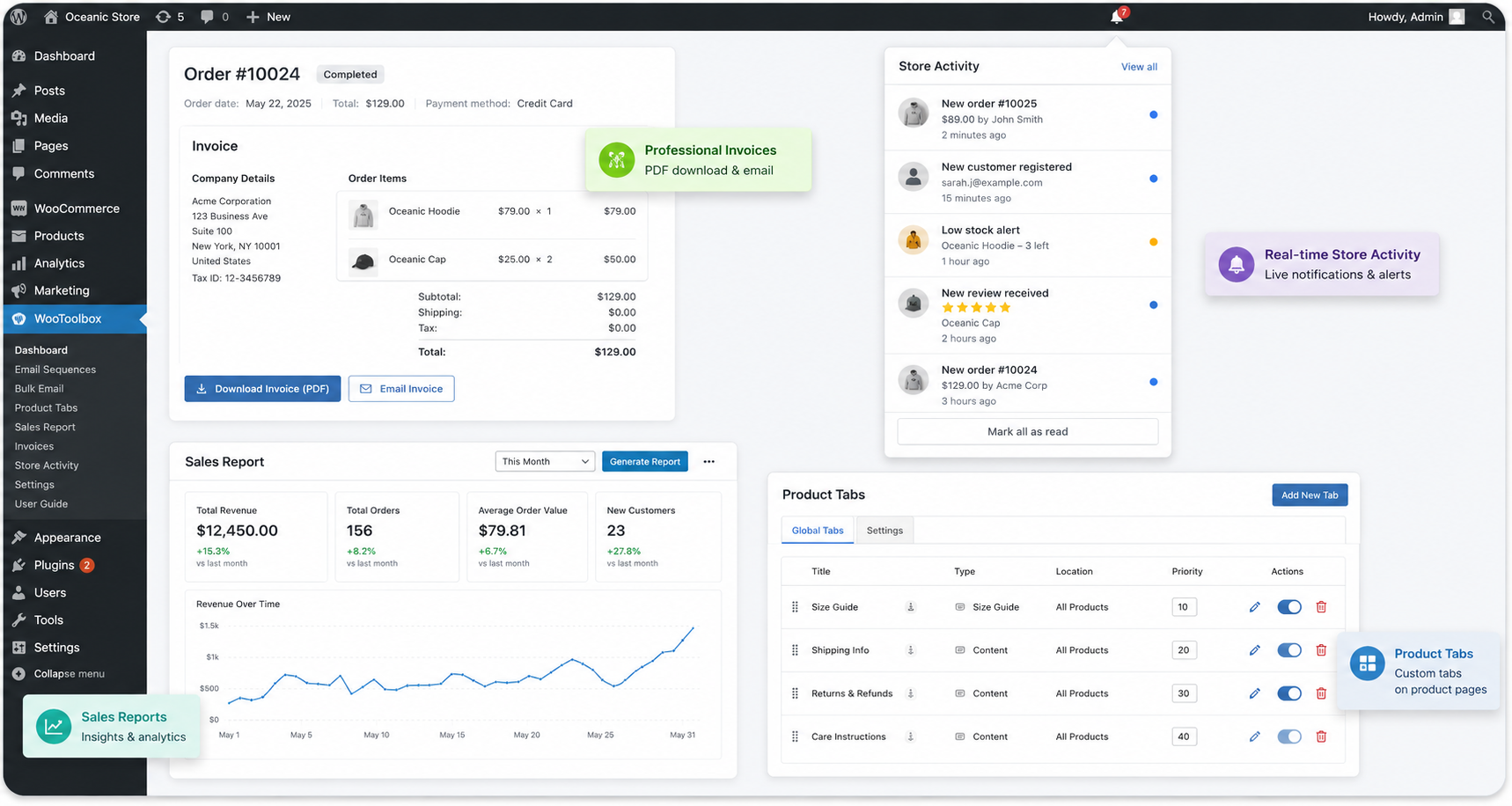
WooToolbox lets your customers download and email professional invoices for any order — instantly.
Each invoice includes:
Your logo, company name, address, and tax ID
Customer details and company name (if applicable)
Full order breakdown with taxes, discounts, and totals
Custom header and footer text
Invoices open in the browser and can be saved as PDF with one click, using the browser’s built-in print function — no slow third-party PDF libraries required.
Admin Benefits:
Customize all invoice fields
Brand your invoices professionally
Reduce support requests for invoice re-issues
Customer Benefits:
Download or email invoices anytime
Edit their own company details for tax receipts
For B2B stores, invoicing information matters. WooToolbox adds a section in My Account → Edit Account, allowing customers to input their company name and tax ID.
Admin Benefits:
Automatically pull customer tax data into invoices
Reduce manual adjustments in accounting
Customer Benefits:
Update company info anytime
Accurate invoice details for bookkeeping
Export your WooCommerce customer data to CSV in seconds — filtered, sorted, and ready for analysis or import into CRMs, newsletters, or accounting systems.
Powerful Filters:
Registration date
Last purchase date
Purchased products
Purchase type (one-time or subscription)
Export Columns:
Name, email, phone, registration date
Total spent, order count, last purchase date
Billing & shipping addresses
Why It Matters:
Accurate customer exports help you analyze behavior, reward loyal customers, and comply with business reporting requirements.
Sometimes you need to send a message to all your customers right now — a new sale, a restock, or a product announcement.
WooToolbox’s Bulk Email feature lets you send manual email campaigns directly from your WordPress dashboard.
Features:
Compose HTML emails with WordPress visual editor
Filter recipients by purchased products
Preview recipient count before sending
Insert dynamic placeholders for personalization
Difference from Automated Sequences:
Bulk Email = one-time campaign
Automated Sequences = post-purchase automation
Create post-purchase email sequences that automatically follow up with your customers based on time delays you define.
Example Use Cases:
Send educational content after purchase
Request reviews or testimonials
Offer complementary products after 7 days
Per-Product Automation:
Each product can have its own email sequence, allowing highly targeted communication.
Features:
Visual editor with placeholders (e.g., {customer_name}, {order_number}, {product_name})
Delay emails by hours or days
Save sequences as reusable templates
Reliability:
Emails use your site’s SMTP configuration for guaranteed delivery.
After checkout, direct customers to a custom thank-you page per product or globally.
Examples:
Redirect digital buyers to a download page
Send service clients to a setup form
Route subscribers to a welcome message
Options:
Set global redirect (for all orders)
Or product-specific redirects
Use placeholders like {order_number} and {order_id} in URLs
Priority Logic:
Product redirect
Global redirect
Default WooCommerce thank-you page
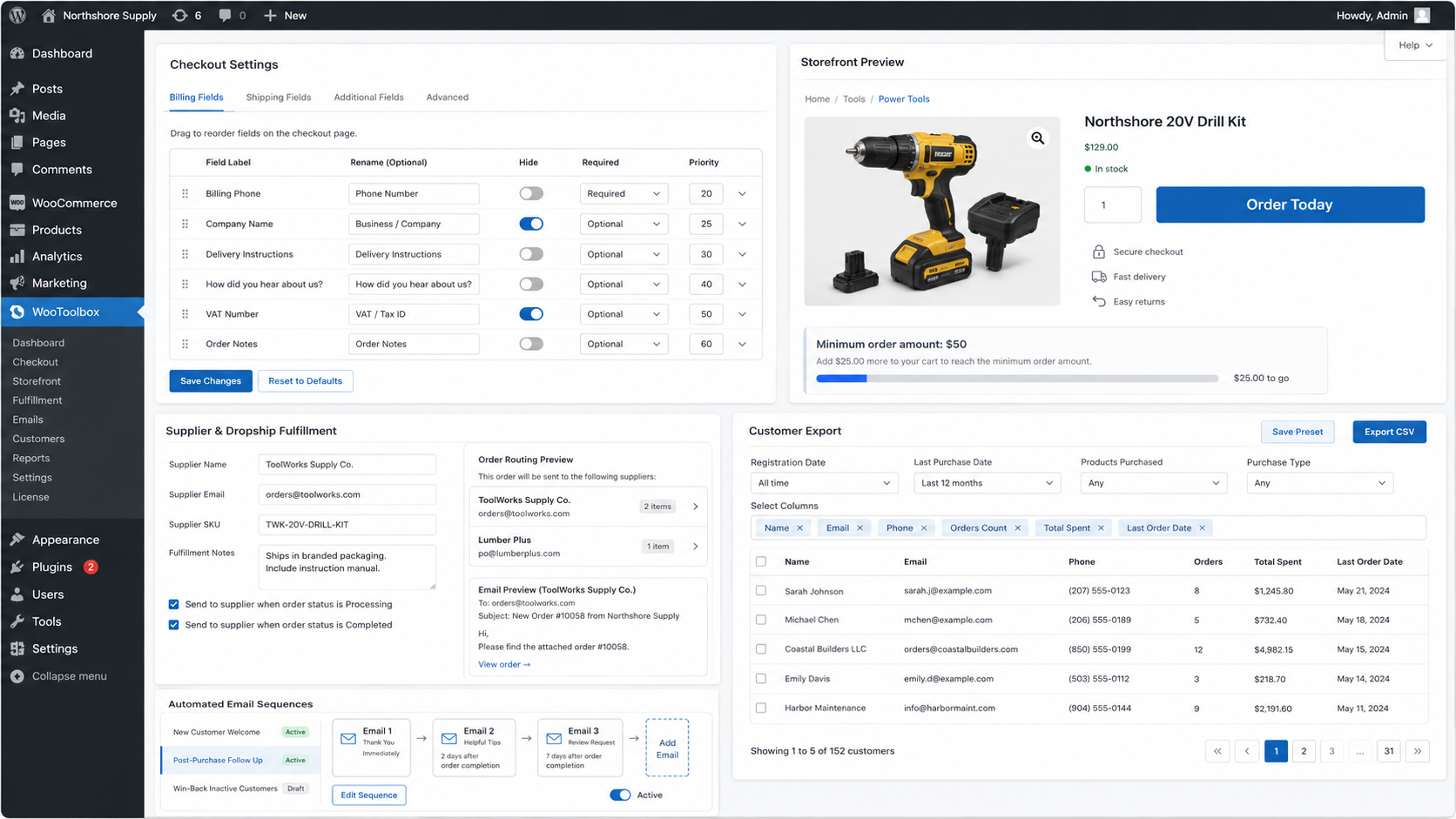
Beyond invoices, customer invoice details, customer export, bulk email, sales reports, automated email sequences and thank-you page redirects, WooToolbox also gives store owners practical checkout and product-page controls. You can customize the classic WooCommerce checkout by hiding, renaming, reordering and requiring fields, add checkout messages, collect delivery instructions and capture “how did you hear about us?” responses.
WooToolbox also helps improve product pages without installing extra plugins. Store owners can manage product tabs, rename or hide Description, Reviews and Additional Information, add global or per-product custom tabs, create size guide or size chart tabs, change Add to Cart button text, and show reassurance lines such as secure checkout, fast delivery and easy returns under the Add to Cart button.
For operations, WooToolbox can enforce minimum order amounts or cart quantities before checkout and automatically email suppliers, warehouses, dropshippers or fulfillment partners when a paid order needs processing. These partner emails can include the relevant products, quantities, shipping details, supplier SKU, fulfillment notes and delivery instructions, with grouped partner emails and duplicate-send protection built in.
Crucial automation to save you time with online store management on the WordPress platform.
Install WooToolbox from your WordPress dashboard (Plugins → Add New → Upload Plugin).
Activate the plugin.
Visit WooToolbox in your admin menu or WooCommerce → WooToolbox.
Enable the features you need — each module can be turned on or off independently.
Configure your SMTP plugin (recommended: WP Mail SMTP or Post SMTP) for reliable email delivery.
That’s it — WooToolbox is ready to work!
Woocommerce Extender
WooToolbox helps store owners automate the repetitive work that usually eats into admin time. Send post-purchase email sequences, run one-time customer email campaigns, export customer lists, redirect buyers to the right thank-you page, and receive monthly sales reports without juggling separate plugins.
It also adds lightweight fulfillment automation. Assign suppliers, warehouses, dropshippers or fulfillment partners to individual products, and WooToolbox can automatically email the right partner when a paid order is ready to process, including product details, quantities, shipping information, supplier SKU, fulfillment notes and delivery instructions.
This keeps your WooCommerce workflow lean: fewer manual emails, fewer missed follow-ups, fewer invoice requests, fewer supplier handoffs, and fewer plugins doing overlapping jobs.
✅ Lightweight and efficient — no unnecessary scripts or bloat
✅ Compatible with all major WooCommerce themes
✅ Follows WordPress and WooCommerce coding standards
✅ Fully translatable (internationalization ready)
✅ Works perfectly on WordPress 5.8+ and PHP 7.4+
WooToolbox runs entirely on your site — no external API calls or dependencies.
Yes. WooToolbox lets you hide, rename, reorder and set required or optional checkout fields on the classic WooCommerce checkout page. You can also add checkout messages, delivery instructions and a “How did you hear about us?” field.
Yes. WooToolbox lets you rename, hide or reorder default WooCommerce product tabs, add custom product tabs, create store-wide tabs and add per-product tabs where needed.
Yes indeed. The plugin enables this feature for your Woocomerce cart and buttons. This is a main Storefront Settings feature and should be searchable for “WooCommerce trust badges,” “reassurance text,” “secure checkout message,” etc.
Yes. You can add a store-wide size guide or size chart tab, then override it on individual products when different sizing information is needed.
Yes. WooToolbox lets you change Add to Cart button text on single product pages and shop/category listings, for example to “Buy Now,” “Book Now,” “Order Today” or another custom phrase.
Yes. WooToolbox can block checkout until the cart reaches a minimum order amount or a minimum total item quantity. This is useful for wholesale, local delivery, food stores and low-margin products.
Yes. WooToolbox lets you assign suppliers, warehouses or dropshipping partners to products and automatically email the correct partner when an order is ready to process. Supplier emails can include product details, quantities, shipping information, supplier SKU, fulfillment notes and delivery instructions.
✅ Lightweight and modular — enable only the WooCommerce tools you need
✅ Compatible with major WooCommerce themes and standard WooCommerce templates
✅ Built to follow WordPress and WooCommerce coding standards
✅ HPOS compatible and tested with WooCommerce 10.8
✅ Translation-ready for multilingual stores
✅ Requires WordPress 6.5+, WooCommerce 8.0+ and PHP 7.4+
WooToolbox runs on your own WordPress site. Core features do not rely on third-party APIs, while email-based tools use your normal WordPress mail setup and work best with SMTP.
WooToolbox generates HTML invoices that you can save as PDF using your browser’s built-in print feature. It’s faster and more reliable than traditional PDF generation libraries.
Absolutely. A “Download Invoice” and “Email Invoice” button appear on their order details page.
Yes — company name, logo, address, tax ID, header, and footer are fully editable from settings.
Yes, under My Account → Edit Account, customers can add their company name and tax ID.
Yes. Once saved, they appear automatically on all future invoices.
Both. You can export all customers, or filter by registration date, purchase date, or products bought.
CSV — easily opened in Excel, Google Sheets, or imported into CRMs.
When an order for that product is marked as “Completed.” Each product triggers its own independent sequence. This is set up when adding a new product, or by editing an old product.
Yes — define hours or days between each follow-up message.
They trigger only once — on the first subscription order, not on renewals.
Bulk Email is a one-time manual campaign you send immediately; Sequences are automatic follow-ups tied to purchases.
Yes — by products purchased, or send to all customers.
Strongly recommended for reliable delivery. WooToolbox works with WP Mail SMTP, Post SMTP, or any SMTP plugin.
Yes — both internal and external redirects are supported.
The plugin prioritizes the first product’s redirect by default.
Yes, this can be done by using placeholders like {order_number} and {order_id}.
Automatically on the last day of each month. It is sent to the site admin by default, plus any additional recipients you add. Included in a sales report: Revenue totals, order counts, top products, top customers, and year-to-date performance.
No. Each feature can be enabled or disabled independently. WooToolbox is a modular plugin.
Yes. It follows WooCommerce styling and works with all major themes and page builders.
WooToolbox can be a credible lightweight alternative to several single-purpose WooCommerce plugins when you need practical store controls in one place instead of a separate plugin for every task. For checkout field editing, it overlaps with tools such as Checkout Field Editor and Manager for WooCommerce by Acowebs and Flexible Checkout Fields for WooCommerce by WP Desk, which are built around adding, editing, hiding and reordering checkout fields. For product tabs, it overlaps with Custom Product Tabs for WooCommerce by YIKES / Code Parrots, Custom Product Tabs for WooCommerce by Web Builder 143, and Custom Product Tabs Manager for WooCommerce by Addify, which focus on adding, editing, hiding and reordering product tabs. For invoices, customer exports, thank-you redirects, Add to Cart text, minimum order rules and supplier notifications, WooToolbox also covers use cases served by plugins such as PDF Invoices & Packing Slips for WooCommerce by WP Overnight, All-in-one PDF Invoice and Packing Slips Suite by WebToffee, YITH WooCommerce PDF Invoice and Shipping List by YITH, WooCommerce Customer / Order / Coupon Export by SkyVerge, Thank You Page for WooCommerce by Nitin Prakash, WooCommerce Redirect Thank You by Shop Plugins, Custom Add To Cart Button for WooCommerce by Kestrel, Minimum and Maximum Quantity for WooCommerce by Extendons, Dropshipping for WooCommerce, and Supplier Order Email by Joan Boluda. WooToolbox is not meant to replace every advanced feature in those specialist plugins, but for stores that need straightforward checkout customization, product tabs, invoices, customer export, supplier emails, Add to Cart text, minimum order rules, redirects and reports, it can reduce plugin clutter and act as a credible all-in-one alternative.
Yes — WooToolbox the plugin has a 30 day free trial. We suggest you test it first to see if it works perfectly with your hosting environment.
Your free trial starts automatically. No license key is needed yet.