PR, SEO & AI Search Studio
Sitetrail · A free WordPress plugin
Your AI-powered content calendar, connected to 100+ news sites and niche blogs. Generate ideas tailored to your business, plan PR and SEO campaigns, and track your media coverage.
One free media submission for eligible accounts.

Digital PR
Give the right readers a timely story, useful research, or informed commentary.
Off-site SEO
Find publications that fit your subject and track which pages your coverage links to.
AI Search
Answer real questions and show sources that readers can check and cite.
Explore the NewsPass network
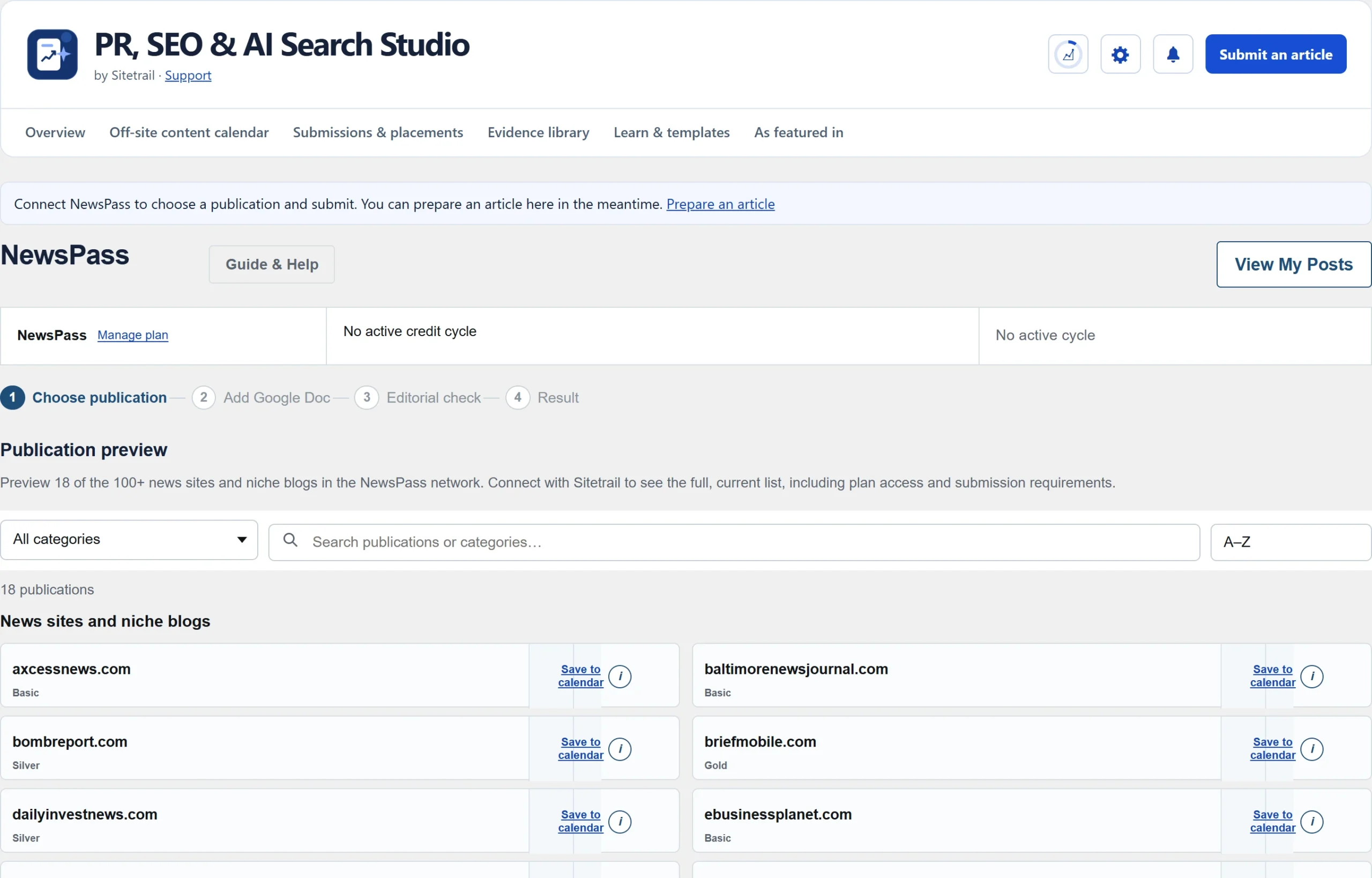
Preview a sample of the 100+ news sites and niche blogs in the NewsPass network. Search by topic or publication name and save promising outlets to your off-site content calendar.
Before you connect
Compare publication topics and tiers without signing in. Save a target while you work on the story.
After you connect
Check submission requirements and plan access. See which publications are included and which open up on a higher tier.
Product walkthrough
Follow a fictional example. Harbor Tool Library is adding evening pickup hours. That’s useful news for local readers and the basis for an educational article for other libraries.
01 · Plan off-site content
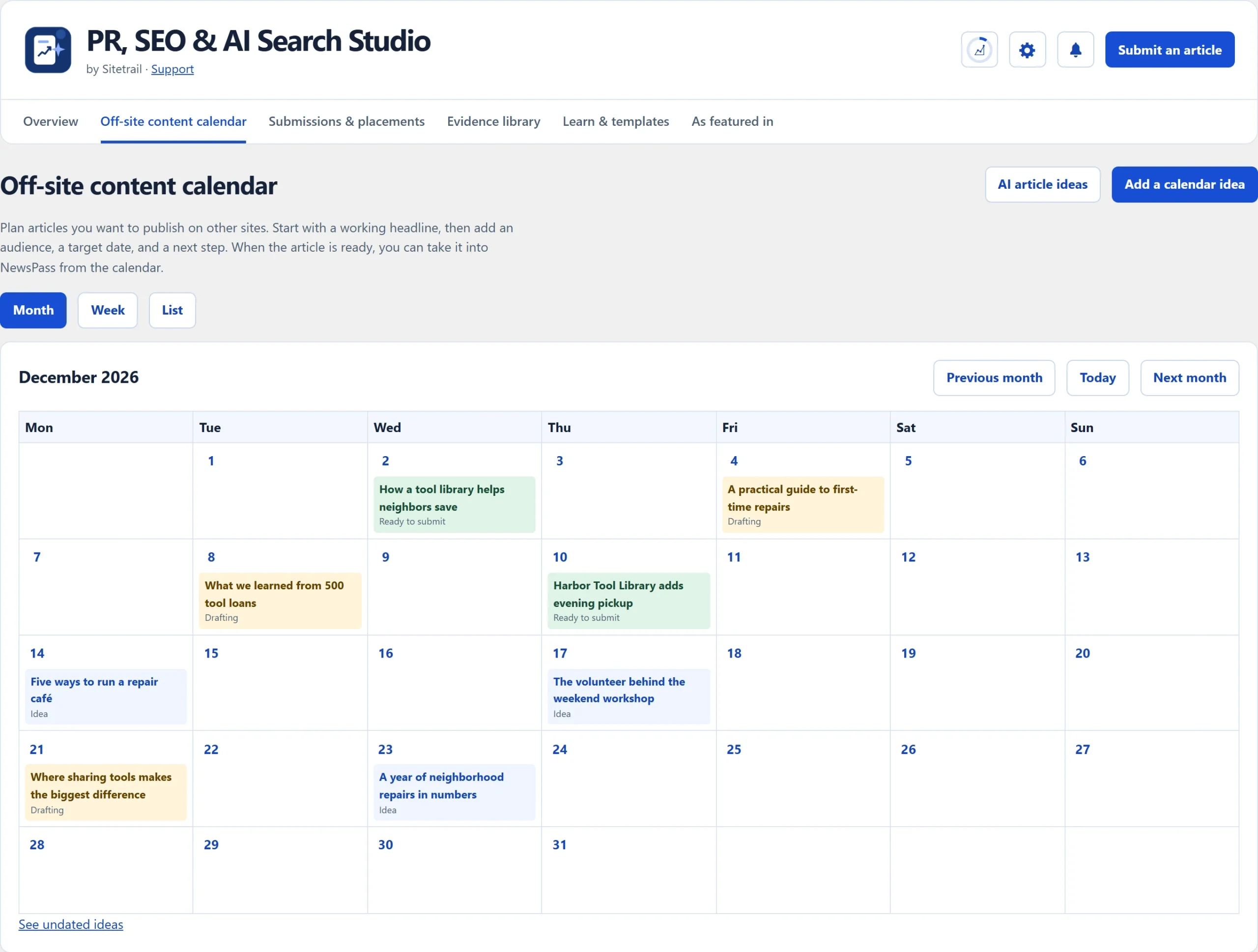
Open the Off-site content calendar and enter a working headline. Add an audience, target publication, date, and next action as the story takes shape.
Use month view to spread out stories, week view to see what’s due, or list view to work through entries. Save original figures, quotes, and source links in the Evidence Library and attach them to the calendar entry.
For Harbor Tool Library, that could be the newly available hours, verified figures on evening demand, and a quote approved by the program director.
Optional starting point
Describe your business, audience, and what you can share. Start with a saved fact if you have one, run the free connection test, and generate headlines and angles you can edit and save.
Start with your own title
A working headline is enough. Add or edit titles manually at any point, including after you’ve used your AI idea allowance.
02 · Write for the publication
Have a genuine announcement? Use the press release template and read a complete example with notes beside the headline, lead, quote, and media contact.
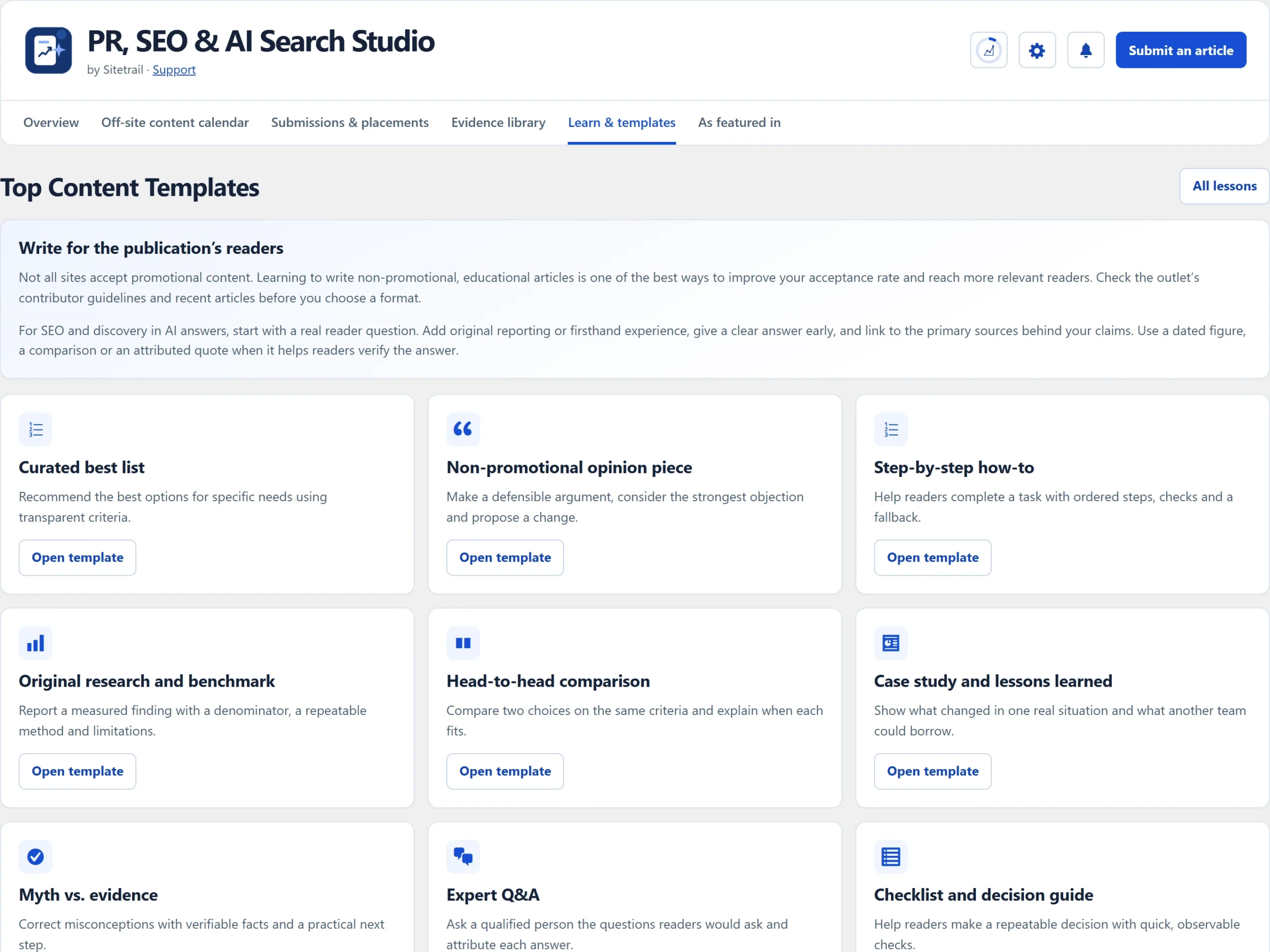
For educational publications, explore Top Content Templates. Try a data-led story, practical how-to, expert Q&A, curated list, or non-promotional opinion piece.
Use a template to open the article form with an example you can adapt, or build a writing prompt from your topic, audience, and evidence to use with your own writing tool.
03 · Submit through NewsPass
Choose Submit an article to select an outlet and see its requirements. Import a viewable Google Doc or paste the complete English-language article. Check the formatting and any required image, then choose Check & Submit.
For eligible accounts
Studio shows the participating outlet before you send an article or press release. Editorial review applies.
When a plan is needed
Compare plans and eligible publications at the point of submission. Checkout takes place on Sitetrail and returns you to your saved draft and publication.
04 · After submission
Open Submissions & placements for the status, editorial feedback, and live article link. Use the notification bell for account updates.
05 · Put coverage to work
Track NewsPass articles and coverage you arranged yourself. Use Coverage by page to group tracked articles by the pages they link to, such as a research report or a product resource.
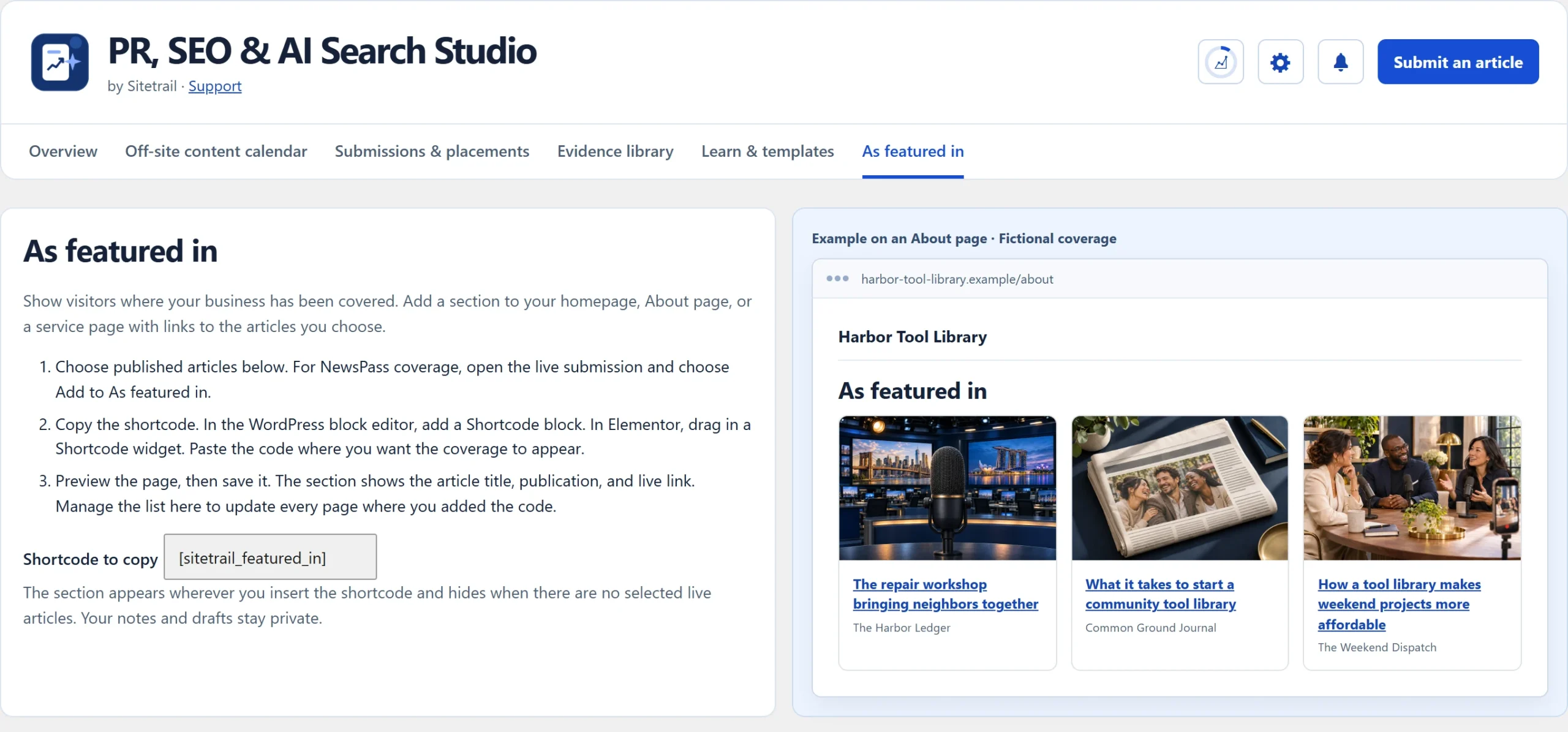
Build an As featured in section for your About page, press page, or homepage. Select and order up to 12 live articles. Feature the first three with your own images or the built-in Media Showcase, or display a text-only list.
Copy the shortcode into the WordPress block editor or Elementor. Preview the selection before publishing it on your site.
Learn & templates
Study complete articles, worked examples, and case studies in WordPress. Learn how to write for an outlet’s readers, explain your methodology, and make important facts easy to verify.
Evidence and attribution
Turn “customers got started faster” into a result with a time period, sample size, and source. Give an editor enough context to quote the finding accurately.
Links and mentions
See how natural anchor text reads in a sentence and what an unlinked brand mention looks like. Learn which older practices to retire and where to follow Google updates.
Practical SEO and GEO
Lead with the reader’s question, support the answer with firsthand evidence, and make individual findings easy to understand on their own.
Free tools and NewsPass plans
Use Studio as your WordPress workspace. Connect a Sitetrail account when you’re ready to check current publication availability or use NewsPass.
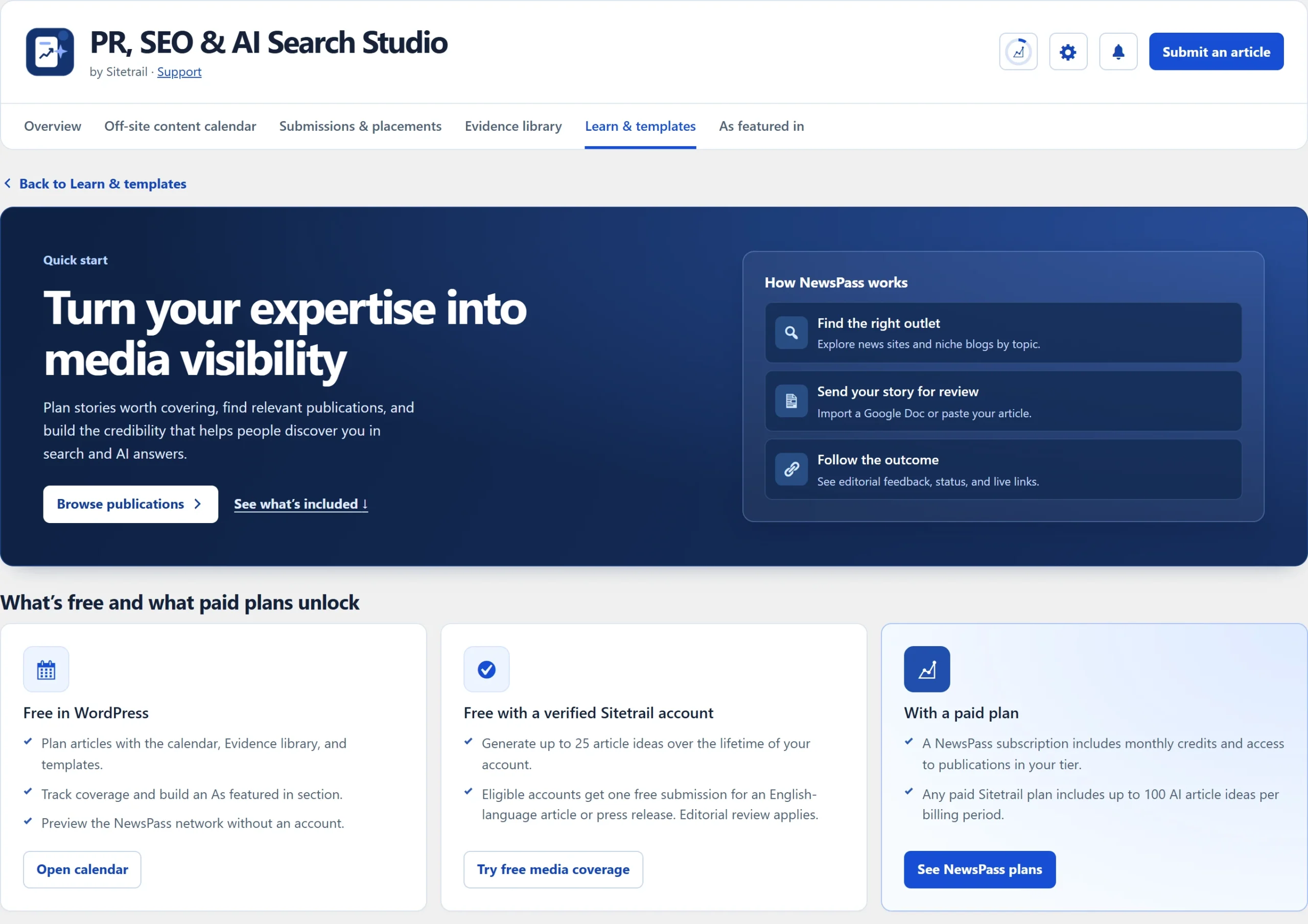
Free in WordPress
Use the calendar, Evidence Library, lessons, templates, manual placement tracking, Coverage by page, and As featured in. Browse the bundled publication preview.
Free with verified email
Verified Sitetrail accounts can generate up to 25 article ideas for life. Eligible accounts can also send one English-language article or press release for editorial review at the participating outlet.
With a paid plan
A NewsPass subscription includes monthly submission credits and publication access for your tier. Any paid Sitetrail plan includes up to 100 AI article ideas per billing period.
For agencies, resellers & web developers
Use Studio on your own agency’s WordPress site to plan, manage and resell PR and SEO campaigns for clients. Build packages around relevant media coverage, content and backlink opportunities, supported by the NewsPass network.
Your agency workspace
Plan stories, choose target publications, organize supporting facts and track live coverage from your agency’s WordPress dashboard. Use the connected NewsPass account to handle submissions and editorial feedback.
Reseller services
Build PR, SEO and link-building services around story development, publication selection and campaign follow-up. Set your own client service fees and use your NewsPass plan’s publication access and credits to support delivery.
Added value for clients
Install the free plugin on client WordPress sites when it suits the project. Give them a media calendar, templates, coverage tracking and an “As featured in” showcase they can keep using.
NewsPass publication access and credits follow the connected account and its plan. The free local tools can be used on multiple WordPress sites.
NewsPass Publishing Partner
Expand your media coverage and backlink opportunities at a lower NewsPass plan price. Contribute a qualifying WordPress site and authorize Sitetrail to publish approved editorial articles from NewsPass members on it. In return, earn a higher publication tier on an eligible paid plan—for example, Silver access at the Basic price.
Check eligibility first—no account needed. Open Publishing Partner in Studio to check the WordPress site it is installed on, before creating a Sitetrail account or granting access. English-language sites need DR 25 or higher. Sites in other languages need DR 50 or higher.
See your potential savings. A qualifying site below DR 70 can move up one plan level. At DR 70 or higher it can move up two levels on an eligible paid plan. Studio shows the potential benefit for your site.
Decide whether to continue. If you qualify, connect your account and authorize the automated publishing test. A new partnership goes live once the test passes and an eligible paid plan is active. You can revoke publishing access from WordPress.
Before you install
Get the details on installation, NewsPass accounts, editorial review, and what stays in WordPress.
Install Studio, connect a free Sitetrail account and verify your email. Eligible accounts can submit one English-language article or press release to the participating news site. Editorial review applies. This is a one-time offer per account; wider publication access comes with a NewsPass plan.
Yes. Agencies can use Studio on their own WordPress site to plan and manage client campaigns and package PR and SEO services for resale. They can also install the free local tools on client sites. NewsPass access, credits and AI allowances follow the connected Sitetrail account and its plan.
Download version 1.0.0 with the Download free plugin button. In WordPress admin, go to Plugins → Add New Plugin → Upload Plugin. Upload and activate the ZIP, then open PR, SEO & AI Search in the WordPress menu. Studio requires WordPress 6.4 or newer and PHP 7.4 or newer.
Yes. Start with the publication preview, calendar, templates, Evidence Library, manual coverage tracker, and showcase. Connect a Sitetrail account on an HTTPS site to use the connected services.
Both work. For a Google Doc, set sharing to Anyone with the link → Viewer, then use Import Google Doc. If the document needs to stay restricted, paste the full article text into the form.
Look in Submissions & placements for editorial status, feedback, and the published link when available. Both free and paid submissions go through editorial review.
Your calendar, evidence, and manually tracked coverage are stored on your WordPress site. Connected features use Sitetrail for tasks such as account access, submissions, and partner eligibility. For AI article ideas, you choose and review the business brief you send.
Yes. Insert the As featured in shortcode in Elementor’s Shortcode widget or the Shortcode block in Gutenberg. Studio’s planning and submission tools run inside WordPress admin.
Yes. Articles and press releases submitted through NewsPass need to be in English. The Publishing Partner program uses separate language and Domain Rating criteria for contributing a website.
Connect the account you already use. Paid Sitetrail plans receive the AI ideas allowance for their billing period. NewsPass subscribers also see their applicable publication access and credits in Studio.
PR, SEO & AI Search Studio by Sitetrail
Find a publication your audience reads. Save an idea, open a template, or bring the article you’ve already written.
Free download · Optional NewsPass plans